

Carbon Intensity
With Carbon Intensity modules in Make, you can monitor and analyze the carbon intensity of electricity generation in your region, access real-time and historical emissions data, track changes in power source mix, and automate sustainability reporting to support environmentally conscious decision-making across your workflows.
What Carbon Intensity modules are available in the Make platform
- Intensity : Get Live Carbon Intensity with Start Date
- Regional : Search a Location by Postcode, Get Data by Country, Get Carbon Intensity from Location with Start Date
- National : Get Generation Mix, Get Statistics Between Two Dates
- Other : Make an API Call
 To use Carbon Intensity in Make, you’ll need your BPT App License Key.
Refer to the Carbon Intensity API documentation for a list of available endpoints. https://carbon-intensity.github.io/api-definitions/#carbon-intensity-api-v2-0-0
Connect Carbon Intensity to Make
To establish the connection in Make, insert a Carbon Intensity module into a scenario. Under Connection, click Create a connection.
The Create a Connection dialog appears.
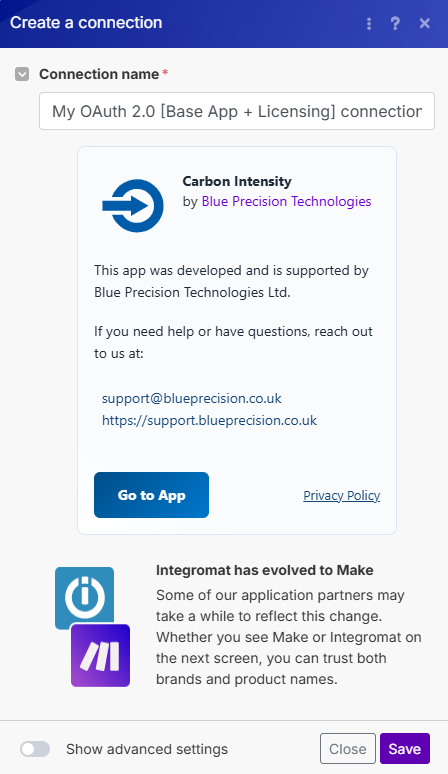
Create a connection Enter your Registered BPT App License Key.
For more information on how to acquire a BPT App License Key, refer to the
FAQ
page.Optional: In the Connection name field, enter a name for the connection.
Click Save.
You have successfully established the connection. You can now edit your scenario and add more Carbon Intensity modules.
Build Carbon Intensity Scenarios
After connecting the app, you can perform the following actions:
Intensity
Get Carbon Intensity with Start Date
Get Carbon Intensity data
This module contains the following fields
| Field | Usage |
|---|---|
| Connection | Establish a connection to your Carbon Intensity account. |
| Datetime From | Select the start date and time for the data collection range. |
| Duration of Data Collection | Choose the duration for which data should be collected. You can select from predefined timeframes. |
Regional
Search a Location by Postcode
Search a Location using the postcode.
This module contains the following fields
| Field | Usage |
|---|---|
| Connection | Establish a connection to your Carbon Intensity account. |
| Postcode | Enter the postcode you want to retrieve data for. |
Get Data by Country
Get data depending by the region
This module contains the following fields
| Field | Usage |
|---|---|
| Connection | Establish a connection to your Carbon Intensity account. |
| Choose Country | Drop-down list of supported countries |
Get Carbon Intensity from Location with Start Date
Get Carbon Intensity data for GB regions
This module contains the following fields
| Field | Usage |
|---|---|
| Connection | Establish a connection to your Carbon Intensity account. |
| Datetime From | Select the start date and time for the data collection range. |
| Duration of Data Collection | Choose the duration for which data should be collected. You can select from predefined timeframes. |
| Select Region | Drop-down list of supported regions. |
| Postcode | Enter the postcode you want to retrieve data for. |
National
Get Generation Mix
Get Generation Mix either from last 24hours or between two Dates
This module contains the following fields
| Field | Usage |
|---|---|
| Connection | Establish a connection to your Carbon Intensity account. |
| Datetime From | Select the start date and time for the data collection range. |
| Duration of Data Collection | Choose the duration for which data should be collected. You can select from predefined timeframes. |
Get Statistics Between Two Dates
Get Carbon Intensity statistics between from and to datetimes
This module contains the following fields
| Field | Usage |
|---|---|
| Connection | Establish a connection to your Carbon Intensity account. |
| Datetime From | Select the start date and time for the data collection range. |
| Datetime To | Select the end date and time for the data collection range. |
| Block Length in hours | Enter the length of each data block in hours. |
Other
Make an API Call
Performs an arbitrary authorized API call.
This module contains the following fields
| Field | Usage |
|---|---|
| Connection | Establish a connection to your Carbon Intensity account. |
| URL | Enter a path relative to https://api.carbonintensity.org.uk. For example: /intensityFor the list of available endpoints, refer to the
Carbon Intensity Documentation
. |
| Method | Select the HTTP method you want to use:GET to retrieve information for an entry.POST to create a new entry.PUT to update/replace an existing entry.PATCH to make a partial entry update.DELETE to delete an entry. |
| Headers | Enter the desired request headers. You don’t have to add authorization headers; we already did that for you. |
| Query String | Enter the request query string. |
| Body | Enter the body content for your API call. |