


Hebcal
Hebcal is a site that provides Jewish holiday calendars & Hebrew date converter. You can manage Jewish holiday dates, candle-lighting times, Torah readings, Daf Yomi schedules, Omer counting, Yahrzeit reminders, daily Zmanim (halachic times), Hebrew/Gregorian date conversions, Rosh Chodesh notifications, and synagogue calendar exports.
 This document assumes that you already have a base knowledge of using the Make platform.
What Hebcal modules are available on the Make platform
- Hebrew Date Conversion : Gregorian to Hebrew - Single, Gregorian to Hebrew – Range of Dates, Hebrew to Gregorian – Single, Hebrew to Gregorian – Range of Dates
- Events : Fetch Event for 1 Person
- Other : Make an API call
Connecting Hebcal to Make
To use Hebcal in Make, you’ll need a BPT App License Key.How do I request a BPT App License Key
After purchasing your app either as part of a bundle or separately, you should have received an email containing the BPT App License Key. If you have not received an email or if you are yet to purchase the app please use the FAQ that will guide you through the process.
How to Create a connection for your Make module
- Login to Make > Select ‘Scenarios’ > Select ‘Create a new scenario’
- Search for “Hebcal” > Select ‘Gregorian to Hebrew’ (NNote that any module can be used; however, we will use this one to test that data is returned.)
- Under Connection, click ‘Create a connection’ > The Create a Connection dialog appears.
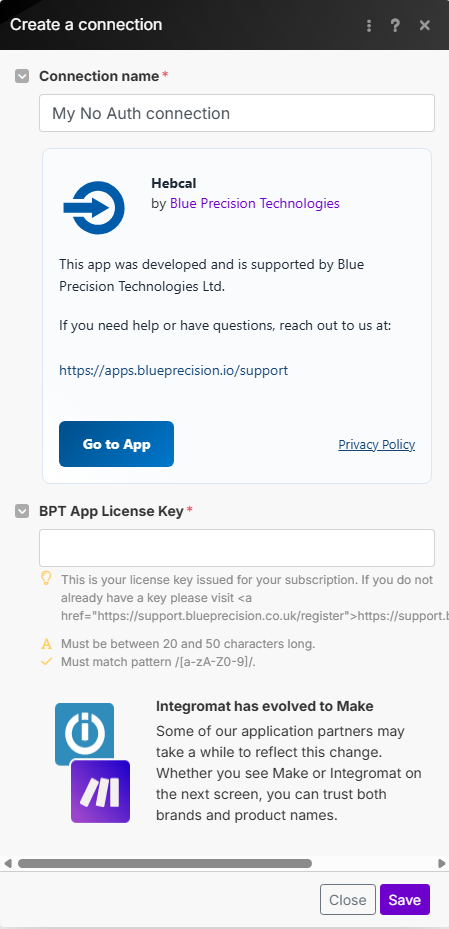
- In the Connection name field, enter a name to identify the connection.
 This is optional, however we recommend you provide a good descriptive name i.e. “Production: Hebcal Connection“.
- Enter your Registered BPT App License Key.
- Click Save.
If you receive a pop-up window with an error message like > {"message":"The request failed"} .
Close the window and wait for the connection to finish verification (Note this may take up to 60 seconds) > Double-check you entered the correct key values and re-tryBuild Hebcal Scenarios
After connecting the app, you can perform the following actions:
Hebrew Date Conversion
Gregorian to Hebrew - Single
Hebrew Date Converter
This module contains the following fields
| Field | Usage |
|---|---|
| Connection | Select the required connection from the drop down.* If no connection exists* Create Connection. |
| After Sunset | Specifies if the Gregorian date provided should be interpreted as occurring after sunset. |
| Is Date split * | Indicates whether the date is split: YYYY-MM-DD or as separate fields Year, Month and Day.If No:• Date: Visitor’s given name.If Yes:• Year: Enter the Gregorian Year• Month: Enter the Gregorian Month• Day: Enter the Gregorian Day |
| Format | Chooses the desired output format, either JSON or XML*. (Advanced Setting field)* |
Gregorian to Hebrew – Range of Dates
To convert a batch of Gregorian dates to Hebrew dates.
This module contains the following fields
| Field | Usage |
|---|---|
| Connection | Select the required connection from the drop down.If no connection exists Create Connection. |
| Gregorian Start date * | The Gregorian start date in YYYY-MM-DD format. |
| Gregorian End date * | The Gregorian end date in YYYY-MM-DD format. |
| Format | Chooses the desired output format, either JSON or XML*. (Advanced Setting field)* |
Hebrew to Gregorian – Single
Convert a single Hebrew date to Gregorian..
This module contains the following fields
| Field | Usage |
|---|---|
| Connection | Select the required connection from the drop down.If no connection exists Create Connection. |
| After Sunset? | Defines a specific Gregorian date range when date splitting is enabled. |
| Split Date | Enter the Hebrew Year, Month and Day:• Hebrew Year: Enter the Hebrew Year• Hebrew Month: Enter the Hebrew Month• Hebrew Day: Enter the Hebrew Day |
| Date | Enter the Hebrew date in YYYY-MM-DD format. |
| Format | Chooses the desired output format, either JSON or XML. (Advanced Setting field) |
Hebrew to Gregorian – Range of Dates
To convert from Hebrew to Gregorian given the amount of Days.
This module contains the following fields
| Field | Usage |
|---|---|
| Connection | Select the required connection from the drop down.If no connection exists Create Connection. |
| Split Date | Enter the Hebrew Year, Month and Day:• Hebrew Year: Enter the Hebrew Year• Hebrew Month: Enter the Hebrew Month• Hebrew Day: Enter the Hebrew Day |
| Number of Days from Start Date | Enter the number of days from the start date. (Must be a number between 1 and 180). |
| Format | Chooses the desired output format, either JSON or XML. (Advanced Setting field) |
Events
Fetch Event for 1 Person
Fetch Event from Date for a single person.
This module contains the following fields
| Field | Usage |
|---|---|
| Connection | Select the required connection from the drop down.If no connection exists Create Connection. |
| Hebdate | Append the Hebrew date to the event titles.. (Default = No) |
| Yizkor | Include Yizkor dates.. (Default = No)If Yes:Which Yizkor Schedule: Select the required value from the drop down. |
| Beginning Hebrew Year | Enter the starting Hebrew year to calculate anniversary dates. |
| Ending Hebrew Year | Enter the final Hebrew year (inclusive) for anniversary date calculations. |
| Include Hebrew Dates in Parts | Include heDateParts for untimed (all-day) items in the response. (Advanced Setting field) |
| Number of Years | Specify how many Hebrew years to include in the anniversary calculation. |
| Date | Enter the Hebrew Year, Month and Day:• Year: Enter the Gregorian Year• Month: Enter the Gregorian Month• Day: Enter the Gregorian Day |
| After Sunset? | Enable this if the event occurs after sunset on the selected date. (Default = Empty) |
| Name | Enter the name associated with the event. |
| Type of event | Select the type of event. Options: Yahrzeit, Birthday, or Anniversary. (Advanced Setting field) |
Fetch Shabbat Times - Beta Testing
Get this week’s Shabbat times and Torah Portion.
This is currently still in development with the Hebcal Team. Please note that functionality may change in the future.This module contains the following fields
| Field | Usage |
|---|---|
| Connection | Select the required connection from the drop down. If no connection exists* Create Connection. * |
| Light Time Before Sunset | Candle-lighting time minutes before sunset (the default is 18). For Jerusalem, the default is b=40 |
| Havdalah at nightfall – tzeit hakochavim | Havdalah at nightfall – tzeit hakochavim, the point when 3 small stars are observable in the night sky with the naked eye (sun 8.5° below the horizon). This option is an excellent default for most places on the planet) |
| Havdalah after Sundown | This option is available for those whose minhag is to end Shabbat a fixed number of minutes after sundown. Typically one would enter 42 min for three medium-sized stars, 50 min for three small stars, 72 min for Rabbeinu Tam, or 0 to suppress Havdalah times. Set to m=0 (zero) to disable Havdalah times |
| Ashkenazis transliterations | use Sephardic (a=off) or Ashkenazis transliterations (a=on) |
| Leyning | include Torah and Haftarah for regular Shabbat (default on) |
| Location Type | Select Location Type |
| Use Elevation | use elevation for location (default off). If on, use elevation to affect the calculation of all sunrise/sunset based zmanim. Note: there are some zmanim such as degree-based zmanim that are driven by the amount of light in the sky and are not impacted by elevation. These zmanim intentionally do not support elevation adjustment |
| Date | You can optionally specify an exact date, for example 13 February 2021. If unspecified, defaults to today |
Other
Make an API Call
Performs an arbitrary authorized API call.
This module contains the following fields
| Field | Usage |
|---|---|
| Connection | Select the required connection from the drop down. If no connection exists Create Connection. |
| **URL *** | Enter a path relative to https://www.hebcal.com/converter?cfg=json For example: &date=2025-03-01&g2h=1&strict=1 Alternate method: Relative path = /converter Set Query string to following: - cfg=json – output format is JSON (cfg=json) or XML (cfg=xml) - g2h=1 – Convert from Gregorian to Hebrew date - date=2025-03-01 – Gregorian date in YYYY-MM-DD format - gs=on – After sunset on Gregorian date - strict=1 – strict mode will return a 400 Bad Request error for invalid dates Refer to the Hebcal API documentation for a list of available endpoints.
Developer APIs – Hebcal |
| **Method *** | Select the HTTP method you want to use: GET to retrieve information for an entry. POST to create a new entry. PUT to update/replace an existing entry. PATCH to make a partial entry update. DELETE to delete an entry. |
| Headers | Enter the desired request headers. Example Key Value pairs: - Content-Type=application/xml Note: You don’t have to add authorization headers; we already did that for you. |
| Query String | Enter the request query string. Example Key Value pairs: - cfg=json – output format is JSON (cfg=json) or XML (cfg=xml) - g2h=1 – Convert from Gregorian to Hebrew date - date=2011-06-02 – Gregorian date in YYYY-MM-DD format |
| Body | Enter the body content for your API call. |