

iLOQ
iLOQ is an innovative digital locking solution that enhances security and access management for various applications. It provides keyless entry and remote access control, making it suitable for both residential and commercial environments. Users can easily manage access rights, ensuring that only authorized individuals can enter specific areas. The system operates on a unique, battery-free design that harnesses energy from the act of inserting the key, reducing maintenance costs and contributing to sustainability. Its robust encryption and wireless communication capabilities ensure secure and reliable access.
When integrated with platforms like Make, iLOQ streamlines workflows and enhances automation. Users can create custom scenarios that trigger actions based on specific events, such as granting access when a user arrives at a location or logging entry and exit times for security audits. This integration provides a seamless connection between physical access control and digital management systems, making iLOQ a forward-thinking solution that combines convenience, security, and efficiency for modern access management needs.
 Prerequisite: This document assumes that you already have a base knowledge of using the Make platform.
What iLOQ modules are available in the Make platform
- Person - List all People, Get a Person, Create a Person, Update a Person, Delete a Person
- Key - List all Keys, List all Keys by Person, Get a Key, Create a Key, Update a Key, Delete a Key
- Lock - List all Locks, Get a Lock, Create a Lock, Update a Lock, Delete a Lock, Get a Lock Logs
- Security Access - List all Security Accesses, Get a Security Access, Create a Security Access, Update a Security Access, Delete a Security Access
- Events - Watch Lock Events
- Other - Make an API Call
Connecting iLOQ to Make
To use iLOQ in Make, you’ll need both your BPT App License Key and your credentials for iLOQ, including Username, Password, Customer Code, and Base URLTo establish the connection in Make, insert an iLOQ module into a scenario. Under Connection, click “Create a connection”
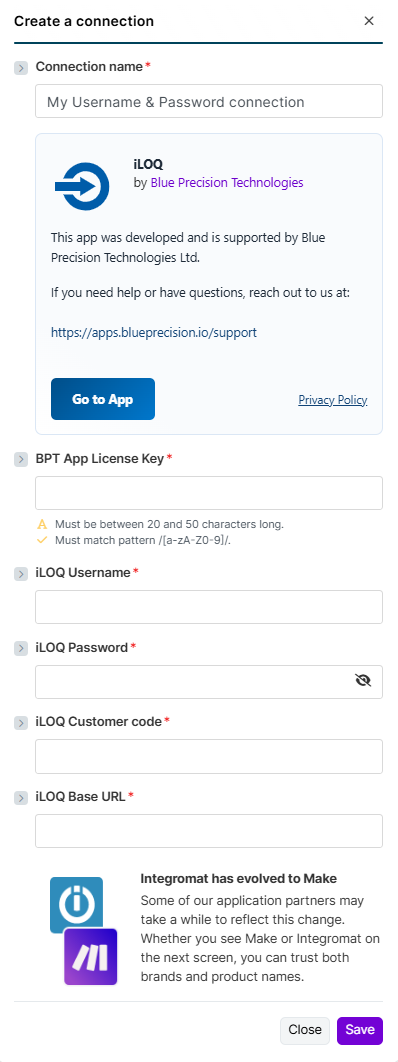
The Create a Connection dialog appears.
In the Connection name field, enter a name to identify the connection.
Enter your Registered BPT App License Key.
For more information on how to acquire an App License Key, refer to the
FAQ
page.Enter your iLOQ Username, Password, and Customer Code.
Enter your iLOQ BaseURL.
- This uses the URL retrieved from the REST API call Resolve URL
Click Save
You have successfully established the connection.
Build iLOQ Scenarios:
After connecting the app, you can perform the following actions:
 Each module will have standard fields and Advanced fields that can only be viewed by toggling on the ‘Show advanced settings’. These are identified in the description for each field.
 Each module, except for Make an API Call, requires you to select the Lock Group.
Person
List all People
This API returns all of the people in the iLOQ system
This module contains the following fields
| Connection | Select the required connection from the drop-down.If no connection exists, Create Connection. |
| Select Lock Group * | Select the Locking System to authenticate for the chosen locking system. (Required) |
Get a Person
Gets individual Person by Identifier
This module contains the following fields
| Connection | Select the required connection from the drop-down.If no connection exists, Create Connection. |
| Select Lock Group * | Select the Locking System to authenticate for the chosen locking system. (Required) |
| Person ID * | The unique identifier of the person whose details are requested. |
Create a Person
Create a new Person into iLOQ system
This module contains the following fields
| Connection | Select the required connection from the drop-down.If no connection exists, Create Connection. |
| Select Lock Group * | Select the Locking System to authenticate for the chosen locking system. (Required) |
| Address | The unique identifier of the person whose details are requested. |
| Company name | Name of the Company that the person is employed by |
| Contact info | Additional info of Person |
| Country | County of Person Resides |
| Description | Free-text field for notes or additional information. |
| Primary email address. | |
| Employment End Date | Date when the person’s employment ended. |
| External Can Edit | Indicates if the external system has permission to edit this record. |
| External Person ID | Identifier assigned by an external system, if applicable. Used for data sync. (Advanced) |
| First Name | First Name |
| Language Code | Person’s language for SMSs and emails. ISO 639 format |
| Last Name | Last Name |
| Person ID | Set a GUID to create a person (Advanced) |
| Person Code | Code identifying user. For example social security number.(Advanced) |
| Phone 1 | Phone number 1 |
| Phone 2 | Phone number 2 |
| Phone 3 | Phone number 3 |
| Post Office | City or post office info |
| State | Is person in use or not in use: 0 = Active person1 = Person is not in use |
| Work Title | Work title in the company. |
| Zip Code | Postal Code of the user |
| Zone IDs | Zones which the user is linked to (Advanced) |
Update a Person
Update an existing person in the iLOQ system
This module contains the following fields
| Connection | Select the required connection from the drop-down.If no connection exists, Create Connection. |
| Select Lock Group * | Select the Locking System to authenticate for the chosen locking system. (Required) |
| Address | The unique identifier of the person whose details are requested. |
| Company name | Name of the Company that the person is employed by |
| Contact info | Additional info of Person |
| Country | County of Person Resides |
| Description | Free-text field for notes or additional information. |
| Primary email address. | |
| Employment End Date | Date when the person’s employment ended. |
| External Can Edit | Indicates if the external system has permission to edit this record. |
| External Person ID | Identifier assigned by an external system, if applicable. Used for data sync. (Advanced) |
| First Name | First Name |
| Language Code | Person’s language for SMSs and emails. ISO 639 format |
| Last Name | Last Name |
| Person ID | Set a GUID to create a person (Advanced) |
| Person Code | Code identifying user. For example social security number.(Advanced) |
| Phone 1 | Phone number 1 |
| Phone 2 | Phone number 2 |
| Phone 3 | Phone number 3 |
| Post Office | City or post office info |
| State | Is person in use or not in use: 0 = Active person1 = Person is not in use |
| Work Title | Work title in the company. |
| Zip Code | Postal Code of the user |
| Zone IDs | Zones which the user is linked to (Advanced) |
Delete a Person
Deletes an individual Person by Identifier
This module contains the following fields
| Connection | Select the required connection from the drop-down.If no connection exists, Create Connection. |
| Select Lock Group * | Select the Locking System to authenticate for the chosen locking system. (Required) |
| Person ID * | The unique identifier of the person whose details are requested. |
Key
List all Keys
This API returns all of the keys in the iLOQ system
This module contains the following fields
| Connection | Select the required connection from the drop-down.If no connection exists, Create Connection. |
| Select Lock Group * | Select the Locking System to authenticate for the chosen locking system. (Required) |
Get a Key
Gets Key by Identifier
This module contains the following fields
| Connection | Select the required connection from the drop-down.If no connection exists, Create Connection. |
| Select Lock Group * | Select the Locking System to authenticate for the chosen locking system. (Required) |
| Key ID * | The unique identifier of the key whose details are requested. |
Create a Key
Create a new key in iLOQ system
This module contains the following fields
| Connection | Select the required connection from the drop-down.If no connection exists, Create Connection. |
| Select Lock Group * | Select the Locking System to authenticate for the chosen locking system. (Required) |
| Description | Key Description/Name |
| Expire Date | Set Expiry Date of new key |
| Key ID | Set GUID of create Key |
| Info Text | Additional Info |
| Key type Mask | iLOQ Key Type |
| Person ID | Person to whom the key is linked to |
| Real estate ID | ID of the real estate where this key belongs to. |
| Rom ID | ROM ID. Not used in inserting new key. (Advanced) |
| Stamp | Stamp. Number consisting of 4 digits written to the physical key. |
| Tag Key | RFID Tag. Empty string if not given (Advanced) |
| Version Code | Version information (Advanced) |
| Renew End Date | When renewing ends |
| Renew Gap Count | Gaps in days/weeks before renewed (depending on Renew Gap Type) |
| Renew Gap Type | KeyScheduler renew type0 = Not in use1 = Daily renew2 = Weekly renew |
| Renew Minute | How long before key’s expiration it is renewed. Time is in minutes. For example if value is 120, new programming packet is made about 2 hours before expiration. Minimum is 70 minutes. |
| Offline Expiration Seconds | S50 Time key works offline in seconds. Zero = unlimited offline access. Maximum is 16761540 seconds for key fob and 8726340 seconds for phone. |
| Security Access IDs | Security accesses which should be linked to the new key |
| Limit Date | Date of which depends on Slot Number. Null when Slot Number is 2 |
| Slot Number | Key time limit slot no0 = S10/S50 start date or S10 timelimit1 = S10/S50 end date or S10 timelimit2 = S50 timelimittitle link |
| End Time (ms) | Start time in milliseconds when this time limit ends on given weekdays For example 57 600 000 would be 16:00 in the afternoon. Must be divisible by 15 minutes. |
| Start Time (ms) | Start time in milliseconds when this timelimit begins on given weekdays. For example 28 800 000 would be 8:00 in the morning. Must be divisible by 15 minutes. |
| Week Day | Weekdays mask to inform when this time limit is in use |
| Time Limit Title ID | ID for a previously set Time Limit (advanced) |
| Time Limit Title End Date | End date of Time LimitT itle in locking systems’s time zone |
| Time Limit Title Start Date | Start date of Time Limit Title in locking systems’s time zone |
| Time Zone ID | Time zone of the time limit. |
| Zone IDs | Zones the new key belongs to |
Update a Key
Update an new key in iLOQ system
This module contains the following fields
| Connection | Select the required connection from the drop-down.If no connection exists, Create Connection. |
| Select Lock Group * | Select the Locking System to authenticate for the chosen locking system. (Required) |
| Description | Key Description/Name |
| Expire Date | Set Expiry Date of new key |
| Key ID | Set GUID of create Key |
| Info Text | Additional Info |
| Is Programmed | Has key ever been programmed yet. Read only. Programming state can be other than Programmed if there has been changes made to the key after it has been programmed the first time |
| Key type Mask | iLOQ Key Type |
| Person ID | Person to whom the key is linked to |
| Programming State | Keys’ and locks’ logical states.0 = Planning state1 = Ordered. Programming packet is available on server. If key is a phone key, then this means that the key has been sent.2 = Packet has been retrieved from server to programming but hasn’t been acknowledget yet3 = Programmed4 = Zeroed. In use only for locks.5 = Cancelled. Inner use only.6 = Obsolete. Inner use only.7 = Programming packet is transferred to programming key but hasn’t been acknowledged yet-1 = Error |
| Real estate ID | ID of the real estate where this key belongs to. |
| Rom ID | ROM ID. Not used in inserting new key. (Advanced) |
| Stamp | Stamp. Number consisting of 4 digits written to the physical key. |
| Stamp Source | The source of the key labeling (Stamp). Read only.0 = User-entered1 = Read from the key. Key labeling (Stamp) can not be edited.2 = Retrieved from the database |
| Tag Key | RFID Tag. Empty string if not given (Advanced) |
| Tag Key Hex | RFID Tag presented as HEX. Empty if TagKey is absent. (Advanced) |
| Tag Key Source | The source of the key’s tagkey enumeration. (Advanced)0 = User-entered1 = Read from the key. Key’s tagkey can not be edited. |
| Version Code | Version information (Advanced) |
Delete a Key
Delete Key by Identifier
This module contains the following fields
| Connection | Select the required connection from the drop-down.If no connection exists, Create Connection. |
| Select Lock Group * | Select the Locking System to authenticate for the chosen locking system. (Required) |
| Key ID * | The unique identifier of the key whose details are requested. |
List all Keys by Person
Gets all keys associated by person
This module contains the following fields
| Connection | Select the required connection from the drop-down.If no connection exists, Create Connection. |
| Select Lock Group * | Select the Locking System to authenticate for the chosen locking system. (Required) |
| Person ID * | The unique identifier of the person whose key details are requested. |
Lock
List all Locks
This API returns all of the Locks in the iLOQ system
This module contains the following fields
| Connection | Select the required connection from the drop-down.If no connection exists, Create Connection. |
| Select Lock Group * | Select the Locking System to authenticate for the chosen locking system. (Required) |
Get a Lock
Gets Locks by Identifier
This module contains the following fields
| Connection | Select the required connection from the drop-down.If no connection exists, Create Connection. |
| Select Lock Group * | Select the Locking System to authenticate for the chosen locking system. (Required) |
| Lock ID * | The unique identifier of the lock whose details are requested. |
Create a Lock
Create a new Lock in iLOQ system
This module contains the following fields
| Connection | Select the required connection from the drop-down.If no connection exists, Create Connection. |
| Select Lock Group * | Select the Locking System to authenticate for the chosen locking system. (Required) |
| Clock Installed | Is clock installed |
| Clock Installed Date | Date when clock was installed |
| Data Version | Data version (Advanced) |
| Description * | Key Description/Name (Required) Max 50 Characters |
| Direction * | Access Directions (Required) Max 50 Characters |
| Door Thickness (mm) * | Door Thickness (Required) Max 50 Characters |
| Door Type | Door Type |
| Ext | Extension or variant number of the lock. |
| Ext Description * | Description for the extension or variant. |
| Extention Piece * | Identifier or description of the mechanical extension piece. |
| Lock ID | Set GUID of created lock (Advanced) |
| Floor Plan ID | Set Floor Plan by ID |
| Floor Plan Point X | X position on floor plan |
| Floor Plan Point Y | Y position on floor plan |
| Handed * | Indicates the handedness (left/right). |
| Hardware Version | Hardware version of the lock. |
| Key Chamber * | Locking chamber or cylinder type. |
| Location Code * | Code representing the physical location. |
| Lock Code * | Internal lock code used for identification. |
| Lock Framework * | Lock framework type or housing reference. |
| Lock Framework Depth * | Depth measurement or parameter of the framework. |
| Locking Object * | Describes the object being secured, such as a door or cabinet. |
| Lock Settings * | Encoded or text-based configuration settings for the lock. |
| Lock State | Lock state from lock’s acknowledge packet. (Advanced) |
| Lock Type | Lock types.• Normal S10 lock• S10 network module lock• S50 lock• C5 lock• S5Online lock for 5 Series network module• D5 locks |
| Manufacturing Info | Details from production, such as batch or factory data. |
| Mech Version | Mechanical design version of the lock. |
| Mounting | How the lock is installed, such as surface or recessed. |
| Other Equipment | Additional equipment associated with this lock. (Advanced) |
| Real estate ID | ID of the real estate where this key belongs to. |
| Secret | Encrypted secret used for secure communication. (Advanced) |
| Serial Number | Factory serial number of the lock hardware. |
| Stamp | Stamp. Number consisting of 4 digits written on the lock. |
| Software Version | Software or firmware version running on the lock. (Advanced) |
| Zone IDs | Zones the new key belongs to |
| S10 Collect Audit Trail | Enables collection of audit events for S10 locks. |
| S40 Accept Soft Group | Allows S40 locks to accept software-based access groups. |
| S40 Flip Flop | Enables toggle (flip-flop) function for S40 locks. |
| S40 Logging On | Activates event logging for S40 locks. |
| S40 Online Required Hard | Requires the lock to operate only when online (strict mode). |
| S40 Online Required Soft | Requires online presence for normal operation but allows exceptions. |
| Save Online Lock Audit Trail | Sends and stores audit trail data on the server. |
| Relay K1 Delay | Delay before relay K1 activates in milliseconds |
| Relay K2 Delay | Delay before relay K2 activates in milliseconds |
| Relay Mask | Bitmask defining which relays are used. (Advanced) |
| Relay Mode | Defines how the relay operates, such as timed or latch mode. Relay lock’s modes0 = Latch1 = Pulse3 = Key hold7 = Roller door255 = Dipp |
| Relay Name Data | Human-readable label for the relay configuration. |
| Relay Packet | Indicates if relay configuration is transferred as a packet. |
| Relay Quasar Delay | Delay specific to Quasar relay function. |
| Relay Quasar Mode | Operating mode for Quasar relay. |
| Lock Respects All Time Limits | Forces the lock to respect all defined access time limits. |
| Relay Mask | Relay selection mask applied to the access rule. |
| Security Access ID | ID linking to the security access profile. |
| Time Limit Title IDs | List of IDs for time-limit profiles applied to the lock. |
Update a Lock
Update an new lock in iLOQ system
This module contains the following fields
| Connection | Select the required connection from the drop-down.If no connection exists, Create Connection. |
| Select Lock Group * | Select the Locking System to authenticate for the chosen locking system. (Required) |
| Default Program Station FProg Key ID | ID of the programming station or key used as the default for this lock. Used when updating configuration or reprogramming associations. |
| Description | Descriptive name or label for the lock. Commonly updated when renaming or clarifying lock usage. |
| Direction | Door swing direction, such as left or right. Indicates physical orientation for installation reference. |
| Door Thickness | Thickness of the door the lock is fitted to. Adjusted if hardware is moved or replaced on a door of different thickness. |
| Door Type | Describes the door material or type, for example wood or steel. |
| Ext | Lock extension code or number. Used to distinguish between lock variants within a model line. |
| Ext Description | Textual description of the extension type or variant. Helps clarify mechanical details. |
| Extention Piece | Identifier or name of the mechanical extension piece attached to the lock. |
| Lock ID | Internal unique identifier for the lock record. Required when performing an update. (Required) |
| Handed | Indicates the door’s handedness (left- or right-handed). Used for correct orientation in planning and maintenance. |
| Key Chamber | Type or specification of the lock’s key chamber or cylinder. Defines compatibility with key systems. |
| Location Code | Custom code or label representing where the lock is installed within the site. |
| Lock Framework | Model or type of the framework (housing) the lock is mounted into. |
| Lock Framework Depth | Depth of the lock framework. Used for installation verification. |
| Locking Object | Description of what the lock secures, such as “Server Room Door” or “Cabinet 12”. |
| Lock Type | Numerical or coded value indicating the lock’s model or operational category. Lock types.• Normal S10 lock• S10 network module lock• S50 lock• C5 lock• S5Online lock for 5 Series network module• D5 locks |
| Mounting | Describes the mounting style, such as surface or recessed installation. |
| Other Equipment | Notes additional connected components, for example strike plates or sensors. |
| Real Estate ID | Identifier linking the lock to a building or real estate record in the system. |
| Stamp | Internal version or update marker used to track modification time. |
| State | Current state of the lock entry, for example active, deleted, or archived. Physical lock states• Lock is in planning• Lock is installed• Lock is not in use• Lock is hidden in 5 Series Manager. |
| Zone ID | Identifier of the zone where the lock belongs. Defines access grouping and security area relationships. |
Delete a Lock
Delete Lock by Identifier
This module contains the following fields
| Connection | Select the required connection from the drop-down.If no connection exists, Create Connection. |
| Select Lock Group * | Select the Locking System to authenticate for the chosen locking system. (Required) |
| Lock ID * | The unique identifier of the key whose details are requested. |
Get Lock Logs
Get Lock Logs by timestamp, Date Range or All logs
This module contains the following fields
| Connection | Select the required connection from the drop-down.If no connection exists, Create Connection. |
| Select Lock Group * | Select the Locking System to authenticate for the chosen locking system. (Required) |
| Lock Logs API endpoint | The unique identifier of the key whose details are requested. |
| Lock IDs | All Lock IDs to be returned in the Logs |
| Key IDs | All Key IDs to be returned in the Logs |
| Going End Date | Return logs where going date is before this end date. |
| Going Start Date | Return logs where going date is after this start date. |
| Type Mask | Lock log types multiple select type:• Unknown type• Failed access• Lock was programmed• Successful access• In a locking system where S50 lock closing reminder is taken into use, indicates that the key holder has accessed a lock that requires key holder’s response if the lock was opened or closed.• Key accessed the lock• 5 Series key accessed the lock• Unknown key (Key is empty or in factory state)• Snap open access• Log is a key passage from a lock which doesn’t collect logs.• Key programming task.• The audit trail GoingDateUtc is not from RTC but the latest timestamp the lock knows• Transit date is incorrect and not available |
| End Date | End date and time the logs are returned for |
| Start Date | Start date and time the logs are returned for |
Security Access
List all Security Accesses
This API returns all of the Security Accesses in the iLOQ system
This module contains the following fields
| Connection | Select the required connection from the drop-down.If no connection exists, Create Connection. |
| Select Lock Group * | Select the Locking System to authenticate for the chosen locking system. (Required) |
Get a Security Access
Gets Security Access by Identifier
This module contains the following fields
| Connection | Select the required connection from the drop-down.If no connection exists, Create Connection. |
| Select Lock Group * | Select the Locking System to authenticate for the chosen locking system. (Required) |
| Security Access ID * | The unique identifier of the Security Access whose details are requested. |
Create a Security Access
Create a new Security Access in iLOQ system
This module contains the following fields
| Connection | Select the required connection from the drop-down.If no connection exists, Create Connection. |
| Select Lock Group * | Select the Locking System to authenticate for the chosen locking system. (Required) |
| Access Mode | Access mode• show as default• hide as default |
| Default Access | Is security access set for locks as default• Security access is not set for locks as default• Security access is set for locks as default |
| Description | Description (Required) Max 50 Characters |
| Ext | Option if time control/additional conditions are on.• Time control is not in use• Time control is in use |
| Ext Description | Description for what the Ext value means (for example, time control is on). |
| Name | Name of Security Access |
| Parent Security Access ID | Parent security access ID if this security access is nested and linked to parent. |
| Real Estate ID | ID of the real estate where this security access belongs to. |
| Security Access ID | Set newly create Security Access GUID. (Advanced) |
| Status | Status. Only Active access rights can be created.• Active• Security access is no longer in use.• Security access is block listed• Security access is lead to blocklist through a key (only possible on lock security accesses)• Blocked |
| Type | Type. Only standard access and API access can be added. Key types are created when keys are block listed.• Key security access. This is only for keys which are in blocklist and is created automatically when Key is block listed.• Standard access• Mask. Not in use.• API Access |
| Version Number | Version number if versioned security access. (Advanced) |
| Zone IDs | Zones the new security access belongs to (Advanced) |
Update a Security Access
Update an new lock in iLOQ system
This module contains the following fields
| Connection | Select the required connection from the drop-down.If no connection exists, Create Connection. |
| Select Lock Group * | Select the Locking System to authenticate for the chosen locking system. (Required) |
| Access Mode | Access mode• show as default• hide as default |
| Default Access | Is security access set for locks as default• Security access is not set for locks as default• Security access is set for locks as default |
| Description | Description |
| Ext | Option if time control/additional conditions are on.• Time control is not in use• Time control is in use |
| Ext Description | Description for what the Ext value means (for example, time control is on). |
| Name | Name of Security Access |
| Parent Security Access ID | Parent security access ID if this security access is nested and linked to parent. |
| Real Estate ID | ID of the real estate where this security access belongs to. |
| Security Access ID * | Set Security Access ID to be updated. (Required) |
| Status | Status. Only Active access rights can be created.• Active• Security access is no longer in use.• Security access is block listed• Security access is lead to blocklist through a key (only possible on lock security accesses)• Blocked |
| Type | Type. Only standard access and API access can be added. Key types are created when keys are block listed.• Key security access. This is only for keys which are in blocklist and is created automatically when Key is block listed.• Standard access• Mask. Not in use.• API Access |
| Version Number | Version number if versioned security access. (Advanced) |
| Zone IDs | Zones the new security access belongs to (Advanced) |
Delete a Security Access
Delete Security Access by Identifier
This module contains the following fields
| Connection | Select the required connection from the drop-down.If no connection exists, Create Connection. |
| Select Lock Group * | Select the Locking System to authenticate for the chosen locking system. (Required) |
| Security Access ID * | The unique identifier of the Security Access whose details are requested. |
Events
Watch Lock Events
Watch New Lock Events on a Poll
This module contains the following fields
| Connection | Establish a connection to your iLOQ account. |
| Select Lock Group * | Select the Locking System to authenticate for the chosen locking system. |
| Lock IDs | All Lock IDs to be returned in the Logs |
| Key IDs | All Key IDs to be returned in the Logs |
| Type | Lock log types multiple select type:• Unknown type• Failed access• Lock was programmed• Successful access• In a locking system where S50 lock closing reminder is taken into use, indicates that the key holder has accessed a lock that requires key holder’s response if the lock was opened or closed.• Key accessed the lock• 5 Series key accessed the lock• Unknown key (Key is empty or in factory state)• Snap open access• Log is a key passage from a lock which doesn’t collect logs.• Key programming task.• The audit trail GoingDateUtc is not from RTC but the latest timestamp the lock knows• Transit date is incorrect and not available |
Other
Make an API Call
Performs an arbitrary authorized API call.
This module does NOT use the Set Lock Group API initially.This module contains the following fields
| Connection | Select the required connection from the drop-down.If no connection exists, Create Connection. |
| URL | Enter a path relative to https://{{baseURL}}/api/v2/. For example: /keysFor the list of available endpoints, refer to the
https://s5.iloq.com/iloqpublicapidoc
. |
| Method | Select the HTTP method you want to use:GET to retrieve information for an entry.POST to create a new entry.PUT to update/replace an existing entry.PATCH to make a partial entry update.DELETE to delete an entry. |
| Headers | Enter the desired request headers. You don’t have to add authorization headers; we already did that for you. |
| Query String | Enter the request query string. |
| Body | Enter the body content for your API call. |