


Postcodes.io
Postcodes.io is a publicly available UK postcode lookup service built on official government data. It provides accurate, up-to-date information linked to each postcode, including geographic location, local councils, health regions, and parliamentary areas. When used through a custom Make app, this service gives scenario builders a simple and reliable way to turn a postcode into meaningful location data, supporting checks, routing decisions, and record enrichment without requiring any background knowledge of how the lookup is performed.
What Postcodes.io modules are available in the Make platform
- Postcode Validation: Get a Postcode, Get a Terminated Postcode, Get a Outward Code, Bulk Postcode Lookup
- Reverse Geocoding: Get a Postcode From Reverse Geocoding, Bulk Postcode Lookup
- Geographical & Demographic Data: Get Nearest Postcode, Get Nearest Outward Code
- Other: Make an API Call
Connect Postcodes.io to Make
- To establish the connection in Make, insert a Postcodes.io module into a scenario. Under Connection, click “Create a connection”.
- The Create a Connection dialog appears.
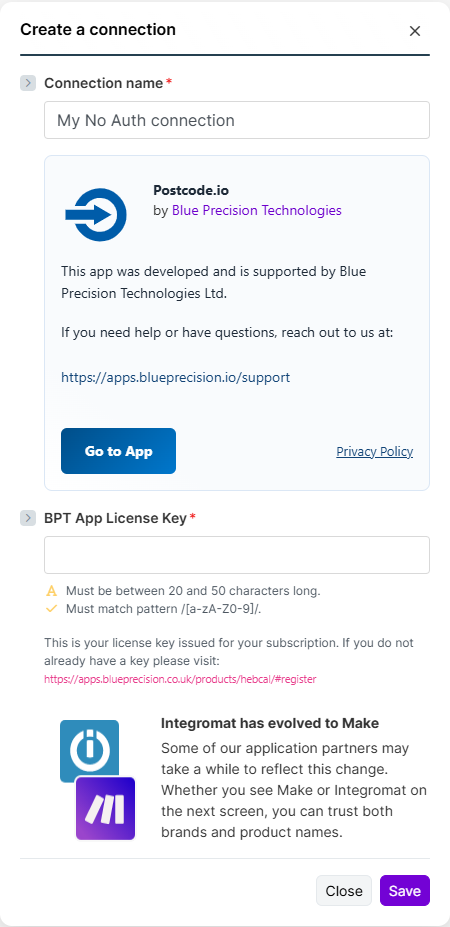
- In the Connection name field, enter a name to identify the connection.
- Enter your Registered BPT App License Key.
 For more information on how to acquire an App License Key, refer to the
FAQ
page.
For more information on how to acquire an App License Key, refer to the
FAQ
page.- Click Save.
You have successfully established the connection.
Build Postcodes.io Scenarios
After connecting the app, you can perform the following actions:
Postcode Validation
Get a Postcode
Look up a postcode.
This module contains the following fields
| Field | Usage |
|---|---|
| Connection | Select the required connection from the drop-down.If no connection exists, create a Connection. |
| Postcode * | UK Postcode (Required) |
Get a Terminated Postcode
Look up a terminated postcode.
This module contains the following fields
| Field | Usage |
|---|---|
| Connection | Select the required connection from the drop-down.If no connection exists, create a Connection. |
| Postcode * | UK Postcode (Required) |
Get a Outward Code
Look up a terminated postcode.
This module contains the following fields
| Field | Usage |
|---|---|
| Connection | Select the required connection from the drop-down.If no connection exists, create a Connection. |
| Outcode * | UK Postcode (Required) |
Bulk Postcode Lookup
Look up a terminated postcode.
This module contains the following fields
| Field | Usage |
|---|---|
| Connection | Select the required connection from the drop-down.If no connection exists, create a Connection. |
| Postcodes * | List of UK Postcodes (Required) |
Reverse Geocoding
Get Postcodes from Reverse Geocoding
Look up Postcodes from Reverse Geocoding.
This module contains the following fields
| Field | Usage |
|---|---|
| Connection | Select the required connection from the drop-down.If no connection exists, create a Connection. |
| Latitude * | Latitude (Required) |
| Longitude * | Longitude (Required) |
Bulk Reverse Geocoding
Look up Postcodes from list of Reverse Geocoding.
This module contains the following fields
| Field | Usage |
|---|---|
| Connection | Select the required connection from the drop-down.If no connection exists, create a Connection. |
| Geolocations * | List of Lat and Lon Coordinates including Radius and Limit of Postcode in a given area (Required) |
Geographical & Demographic Data
Get Nearest Postcode
Look up Nearest postcodes in the area.
This module contains the following fields
| Field | Usage |
|---|---|
| Connection | Select the required connection from the drop-down.If no connection exists, create a Connection. |
| Postcode * | UK Postcode (Required) |
Get a Nearest Outward Code
Look up Nearest Outward Code in the area.
This module contains the following fields
| Field | Usage |
|---|---|
| Connection | Select the required connection from the drop-down.If no connection exists, create a Connection. |
| Outcode * | UK Outcode (Required) |
Other
Make An API Call
Performs an arbitrary authorized API call.
This module contains the following fields
| Field | Usage |
|---|---|
| Connection | Select the required connection from the drop down.If no connection exists Create Connection. |
| URL | Enter a path relative to https://www.intasite.com/api/v1/. For example:/memberRefer to the Intasite
API documentation
for a list of available endpoints.Note that you will need to contact Intasite support to get access to the full list. |
| Method | Select the HTTP method you want to use:GET to retrieve information for an entry.POST to create a new entry.PUT to update/replace an existing entry.PATCH to make a partial entry update.DELETE to delete an entry. |
| Headers | Enter the desired request headers. You don’t have to add authorization headers; we already did that for you. |
| Query String | Enter the request query string. |
| Body | Enter the body content for your API call. |