

Radix IoT Mango
About
Radix IoT Mango is an industrial data platform. Its Make app lets you use Mango data points, tags, point values, data sources, devices, events, comments and users in automation scenarios.
Prerequisite: This guide assumes basic familiarity with Make scenarios and access to a Mango instance.
What Radix IoT Mango modules are available in the Make platform
- Data Points – Search for Data Points, Get a Data Point, Create a Data Point, Update a Data Point definition, Enable Data Point, Update Data Point, Delete a Data Point, Start bulk Data Point operation, Get bulk Data Point operation status
- Data Point Tags – Search Data Point tags, Get Data Point tags, List Data Point tag keys, List values for a tag key, Set Data Point tags, Merge Data Point tags, Run bulk Data Point tag operation
- Point Values – Get the Latest Data Point Value, Get historical Data Point values, Write a Data Point value
- Data Sources and Devices – Search Data Sources, Get a Data Source, Get Data Source Status, Get Device Name by Identifier
- Events – Get All Active Events by User, Query Events, Get unacknowledged event summary, Acknowledge Event
- Comments and Users – Get a Comment by XID, Get All Users, Add User Comment, Update a User Comment by XID
- Other – Make an API Call
Connecting Radix IoT Mango to Make
To create a connection, you need a registered BPT App License Key, the Mango REST Base URL, and a Mango username and password with access to the actions you plan to run.
How do I request a BPT App License Key?
If you do not have a key for this app, follow How to request and use a BPT License Key for Make Apps .
How to create a connection for your Make module
In Make, open or create a scenario and add a Radix IoT Mango module.
Under Connection, select Create a connection.
Enter a recognizable connection name.
Enter your registered BPT App License Key.
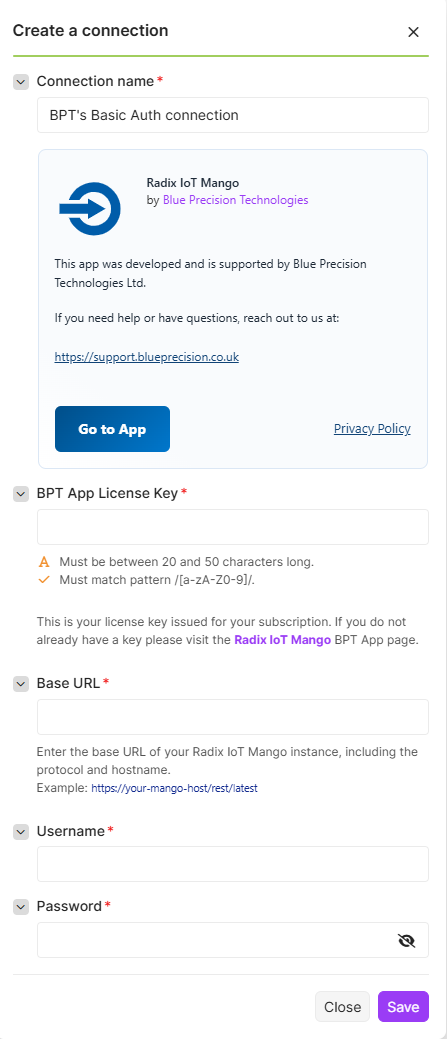
Enter your Mango Base URL, such as
https://your-mango-host/rest/latest.Enter your Mango Username and Password, then select Save.
The connection process checks the BPT license and validates the Mango credentials using the current-user endpoint. Use the link in the connection banner for Blue Precision app information.
How to test the connection
- Choose Get All Users if your Mango account may list users. If it cannot, choose Get a Data Point and enter a data point XID that your account may read.
- Save the module and run it once.
- Check that the output contains the expected Mango data. If the request fails, confirm the Base URL, credentials, license key and Mango permissions before retrying.
How to update a connection
If the license key, Mango URL or credentials change, edit the saved connection in Make and test it again with a read-only module.
Build Radix IoT Mango scenarios
Choose a group below, select a module, and select your saved Mango connection. An asterisk (*) marks a required field. A field that appears after a selection is required only when that choice is active. Use an XID where the field asks for an XID; a numeric database ID is a different identifier. For JSON inputs, follow the data format accepted by your Mango API version.
Data Points
Search for Data Points
Find data points by numeric ID, XID or device name, or use an advanced ASTNode query.
This module contains the following fields
| Field | Description |
|---|---|
| Connection | Select or create the Radix IoT Mango connection to use for this module. |
| Filter mode * | Choose Basic to filter by data point ID, XID or device name; choose Advanced to provide ASTNode JSON. |
| Filter by * | Shown when Basic (ID / XID / Device name) is selected. Choose an option. |
| Data point ID * | Shown when Basic (ID / XID / Device name) → ID is selected. Enter a number. |
| Data point XID * | Shown when Basic (ID / XID / Device name) → XID is selected. Enter data point xid. |
| Device name contains * | Shown when Basic (ID / XID / Device name) → Device name (contains) is selected. Enter device name contains. |
| ASTNode (JSON) * | Shown when Advanced (ASTNode JSON) is selected. Example: {“name”:“like”,“arguments”:[“deviceName”,"*Boiler*"]} |
| limit | Set the maximum number of results to return. Default: 100. Show advanced settings to display this field. |
Get a Data Point
Retrieve one data point by XID.
This module contains the following fields
| Field | Description |
|---|---|
| Connection | Select or create the Radix IoT Mango connection to use for this module. |
| Data Point XID * | Enter the data point XID, rather than its numeric database ID. |
Create a Data Point
Create a data point from a Mango data point JSON object.
This module contains the following fields
| Field | Description |
|---|---|
| Connection | Select or create the Radix IoT Mango connection to use for this module. |
| Data Point JSON * | Full Mango Data Point model in JSON. Identify the resource by XID and do not send a numeric ID for writes. |
Update a Data Point definition
Update a data point definition identified by XID.
This module contains the following fields
| Field | Description |
|---|---|
| Connection | Select or create the Radix IoT Mango connection to use for this module. |
| Data Point XID * | Use the XID, not the numeric database ID. |
| Data Point JSON * | Full Mango Data Point model in JSON. Identify the resource by XID and do not send a numeric ID for writes. |
Enable Data Point
Enable or disable a data source. This module uses a Data Source XID despite its name.
This module contains the following fields
| Field | Description |
|---|---|
| Connection | Select or create the Radix IoT Mango connection to use for this module. |
| Data Source XID * | Enter the data source XID. |
| Enabled * | Choose whether to enable or disable the data source. Default: True. |
| Restart | Choose whether to restart the data source after the change. Default: False. |
| Event Persistence Setting | Provide the event persistence setting if needed by your data source. |
Update Data Point
Force a data source to poll. This module uses a Data Source XID despite its name.
This module contains the following fields
| Field | Description |
|---|---|
| Connection | Select or create the Radix IoT Mango connection to use for this module. |
| Data Source XID * | Enter the data source XID. |
For changes to a data point model, use Update a Data Point definition.
Delete a Data Point
Delete a data point identified by XID.
This module contains the following fields
| Field | Description |
|---|---|
| Connection | Select or create the Radix IoT Mango connection to use for this module. |
| Data Point XID * | Use the XID, not the numeric database ID. |
Start bulk Data Point operation
Start a bulk data point operation and receive an operation ID.
This module contains the following fields
| Field | Description |
|---|---|
| Connection | Select or create the Radix IoT Mango connection to use for this module. |
| Bulk request JSON * | Mango DataPointBulkRequest JSON. Starting the operation does not confirm that every item succeeded. |
Run Get bulk Data Point operation status with the returned operation ID to confirm the outcome.
Get bulk Data Point operation status
Check the progress or outcome of a bulk data point operation.
This module contains the following fields
| Field | Description |
|---|---|
| Connection | Select or create the Radix IoT Mango connection to use for this module. |
| Operation ID * | Enter the ID returned when the bulk operation was started. |
Data Point Tags
Search Data Point tags
Search data points using a tag query.
This module contains the following fields
| Field | Description |
|---|---|
| Connection | Select or create the Radix IoT Mango connection to use for this module. |
| RQL query | Vendor RQL query. Confirm syntax on the target instance. |
Get Data Point tags
Read the tags on one data point.
This module contains the following fields
| Field | Description |
|---|---|
| Connection | Select or create the Radix IoT Mango connection to use for this module. |
| Data Point XID * | Use the XID, not the numeric database ID. |
List Data Point tag keys
List available data point tag keys.
This module contains the following fields
| Field | Description |
|---|---|
| Connection | Select or create the Radix IoT Mango connection to use for this module. |
List values for a tag key
List values associated with a tag key.
This module contains the following fields
| Field | Description |
|---|---|
| Connection | Select or create the Radix IoT Mango connection to use for this module. |
| Tag key * | Enter the tag key whose values you want to list. |
Set Data Point tags
Set the tags on a data point.
This module contains the following fields
| Field | Description |
|---|---|
| Connection | Select or create the Radix IoT Mango connection to use for this module. |
| Data Point XID * | Use the XID, not the numeric database ID. |
| Tags JSON * | JSON object containing tag key/value pairs, for example {“site”:“north”}. |
Merge Data Point tags
Merge supplied tags into a data point’s existing tags.
This module contains the following fields
| Field | Description |
|---|---|
| Connection | Select or create the Radix IoT Mango connection to use for this module. |
| Data Point XID * | Use the XID, not the numeric database ID. |
| Tags JSON * | JSON object containing tag key/value pairs, for example {“site”:“north”}. |
Run bulk Data Point tag operation
Run a bulk tag operation using a Mango TagBulkRequest JSON object.
This module contains the following fields
| Field | Description |
|---|---|
| Connection | Select or create the Radix IoT Mango connection to use for this module. |
| Bulk request JSON * | TagBulkRequest JSON as defined by Mango. |
Point Values
Get the Latest Data Point Value
Retrieve the latest value of a data point.
This module contains the following fields
| Field | Description |
|---|---|
| Connection | Select or create the Radix IoT Mango connection to use for this module. |
| Data Point XID * | Enter the data point XID, rather than its numeric database ID. |
Get historical Data Point values
Retrieve historical values for a data point over a time range.
This module contains the following fields
| Field | Description |
|---|---|
| Connection | Select or create the Radix IoT Mango connection to use for this module. |
| Data Point XID * | Use the XID, not the numeric database ID. |
| From timestamp | Timestamp in Mango-compatible format. |
| To timestamp | Timestamp in Mango-compatible format. |
| Maximum results | Set the maximum number of values to return. |
Write a Data Point value
Write a value to a writable data point.
This module contains the following fields
| Field | Description |
|---|---|
| Connection | Select or create the Radix IoT Mango connection to use for this module. |
| Data Point XID * | Use the XID, not the numeric database ID. |
| Point value JSON * | JSON value object matching Mango point-value input schema. Use only a writable point. |
| Translations * | A required Mango translations value. Confirm the accepted format for your Mango instance. |
Data Sources and Devices
Search Data Sources
Search data sources with optional query, sorting and paging controls.
This module contains the following fields
| Field | Description |
|---|---|
| Connection | Select or create the Radix IoT Mango connection to use for this module. |
| Query (RQL) | Optional RQL filter expression. |
| Limit | Set the maximum number of results to return. Default: 100. |
| Offset | Set how many records to skip before returning results. Default: 0. |
| Sort order | Choose the order of the returned results. Options: Name (A to Z), Name (Z to A), XID (A to Z), XID (Z to A). |
Get a Data Source
Retrieve one data source by XID.
This module contains the following fields
| Field | Description |
|---|---|
| Connection | Select or create the Radix IoT Mango connection to use for this module. |
| Data Source XID * | Enter the data source XID. |
Get Data Source Status
Retrieve a data source’s status by XID.
This module contains the following fields
| Field | Description |
|---|---|
| Connection | Select or create the Radix IoT Mango connection to use for this module. |
| Data Source XID * | Enter the data source XID. |
Get Device Name by Identifier
Find a device using its numeric ID or XID.
This module contains the following fields
| Field | Description |
|---|---|
| Connection | Select or create the Radix IoT Mango connection to use for this module. |
| Find device by * | Choose ID or XID. The matching Device ID or Device XID field then appears. |
| Device ID * | Shown when ID is selected. Enter a whole number. |
| Device XID * | Shown when XID is selected. Enter device xid. |
Events
Get All Active Events by User
List active events for a user.
This module contains the following fields
| Field | Description |
|---|---|
| Connection | Select or create the Radix IoT Mango connection to use for this module. |
| User ID * | Enter the Mango user ID. |
| limit * | Maximum number of active events to return. Default: 100. Show advanced settings to display this field. |
Query Events
Search events with optional query, sorting and paging controls.
This module contains the following fields
| Field | Description |
|---|---|
| Connection | Select or create the Radix IoT Mango connection to use for this module. |
| Query (RQL) | Optional RQL filter expression. |
| Limit | Set the maximum number of results to return. Default: 100. |
| Offset | Set how many records to skip before returning results. Default: 0. |
| Sort order | Choose the order of the returned results. Options: Newest active event first, Oldest active event first, Event ID (high to low), Event ID (low to high). |
Get unacknowledged event summary
Retrieve a summary of unacknowledged events.
This module contains the following fields
| Field | Description |
|---|---|
| Connection | Select or create the Radix IoT Mango connection to use for this module. |
Acknowledge Event
Acknowledge an event by ID.
This module contains the following fields
| Field | Description |
|---|---|
| Connection | Select or create the Radix IoT Mango connection to use for this module. |
| Event ID * | Enter the numeric event ID. |
Comments and Users
Get a Comment by XID
Retrieve a comment by XID.
This module contains the following fields
| Field | Description |
|---|---|
| Connection | Select or create the Radix IoT Mango connection to use for this module. |
| Comment XID * | Enter the comment XID. |
Get All Users
List Mango users.
This module contains the following fields
| Field | Description |
|---|---|
| Connection | Select or create the Radix IoT Mango connection to use for this module. |
| Limit | Maximum number of returned results (bundles). Default: 100. |
Add User Comment
Add a comment to a data point, event or JSON data item.
This module contains the following fields
| Field | Description |
|---|---|
| Connection | Select or create the Radix IoT Mango connection to use for this module. |
| Comment Type * | Choose Data point, Event or JSON data. The matching reference ID field then appears. |
| Data point reference ID * | Shown when Data point is selected. Numeric reference ID for the data point comment. |
| Event ID * | Shown when Event is selected. Numeric ID of the event to comment on. |
| JSON data reference ID * | Shown when JSON data is selected. Numeric reference ID for the JSON data comment. |
| User * | Choose a user or map their numeric ID. |
| Comment * | Enter the comment text. |
| Comment name | Optionally enter a name or title for the comment. Show advanced settings to display this field. |
| Comment XID | Optional external ID for the new comment. Show advanced settings to display this field. |
Update a User Comment by XID
Update a comment identified by XID.
This module contains the following fields
| Field | Description |
|---|---|
| Connection | Select or create the Radix IoT Mango connection to use for this module. |
| XID * | The comment XID is a system wide universal ID for the comment. |
| Comment Type | If changing the comment target, choose its type and provide the matching reference ID. |
| Data point reference ID * | Shown when Data point is selected. Numeric reference ID for the data point comment. |
| Event ID * | Shown when Event is selected. Numeric ID of the event to comment on. |
| JSON data reference ID * | Shown when JSON data is selected. Numeric reference ID for the JSON data comment. |
| User | Choose a user or map their numeric ID. |
| Comment * | Enter the comment text. |
| Comment name | The comment name or title. Show advanced settings to display this field. |
Other
Make an API Call
Send a custom request to a path relative to the configured Mango REST base URL.
This module contains the following fields
| Field | Description |
|---|---|
| Connection | Select or create the Radix IoT Mango connection to use for this module. |
| URL * | Enter a path relative to the configured base URL, without a leading slash. |
| Method * | Choose the HTTP method for the request. Default: GET. |
| Headers | Add endpoint-specific headers. Mango Basic authentication is supplied by the connection. Default: [{‘key’: ‘Content-Type’, ‘value’: ‘application/json’}]. |
| Query String | Add query parameters required by the endpoint. |
| Body | Enter the request body for a method that accepts one. |
Help and documentation status
For BPT app and license help, visit Blue Precision support . For Mango JSON shapes and supported operations, use the API documentation for your Mango instance and version.
Modules are organised into the seven groups listed above. If your Make installation shows modules under Other, use the module names in this guide to find the action you need.